
SQL Server defaults to growing data files by 1MB and transaction logs by 10%; neither of those are best practice. If your database is small they don’t hurt, however as database grows and gets larger, there will be performance issues. Growing a 1TB size database 1MB at a time is painful. And if you have 100GB transaction log file setting it to grow by 10% can be painful also; because you might run of disk space quickly. Another concern is any growth events take a while to execute, so we want to minimize the blocking cause by these.
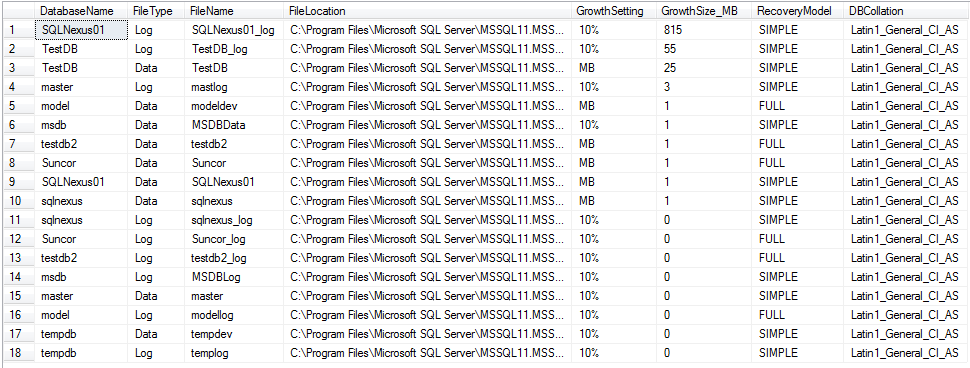
Best time to grow a database is off-hours, manually, auto growth is there for emergencies not as a replacement for a DBA. Following script helps identify databases with percent growth or growth set to 1MB.
-- SQLCanada, Mohit K. Gupta
-- Script from https://sqlcan.wordpress.com
-- Last Updated: May 12, 2012
------------------------------------------

  SELECT DB_NAME(database_id) AS DatabaseName,
         CASE WHEN type_desc = 'ROWS' THEN
            'Data'
         ELSE
            'Log'
         END AS FileType,
         name AS FileName,
         physical_name AS FileLocation,
         CASE WHEN is_percent_growth = 1 THEN
            CAST(growth AS VARCHAR) + '%'
         ELSE
            'MB'
         END AS GrowthSetting,
         CASE WHEN is_percent_growth = 1 THEN
            CAST((((size*growth)/100)*8)/1024 AS BIGINT)
         ELSE
            (growth * 8)/1024
         END AS GrowthSize_MB,
         DATABASEPROPERTYEX(db_name(database_id),'Recovery') AS RecoveryModel,
         DATABASEPROPERTYEX(db_name(database_id),'Collation') AS DBCollation
    FROM sys.master_files
ORDER BY GrowthSize_MB DESC
Example Output:
 SQL Canada (SQLCAN)