
Starting SQL 2008, we have had Query Hash column in sys.dm_exec_query_stats. It helps group common queries together, because when SQL Server is generating execution plan or caches queries it bases it on a HASH value it calculates. However, if you’re application is mostly using T-SQL (e.g. not Stored Procedures); then the HASH value be different every time. So the Query Stats DMV couldn’t provide proper grouping until 2008; script below takes advantage of that and gives you total stats for key columns.
-- SQLCanada, Mohit K. Gupta
-- Script from https://sqlcan.wordpress.com
-- Last Updated: May 12, 2012
------------------------------------------

WITH QSD (SQLStatement, PlanHandle, NumOfExecutions, Duration_ms, CPU_ms, Reads, Writes, QueryHash)
AS (SELECT   SUBSTRING(st.text,
                       (qs.statement_start_offset/2)+1,
                        ((CASE qs.statement_end_offset WHEN -1 THEN
                             DATALENGTH(st.text)
                          ELSE
                             qs.statement_end_offset
                          END - qs.statement_start_offset)/2) + 1)  AS SQLStatement
            , qs.plan_handle AS PlanHandle
            , execution_count AS NumOfExecutions
            , total_elapsed_time/1000 AS Duration_ms
            , total_worker_time/1000 AS CPU_ms
            , total_logical_reads AS Reads
            , total_logical_writes AS Writes
            , query_hash AS QueryHash
       FROM sys.dm_exec_query_stats qs
CROSS APPLY sys.dm_exec_sql_text (qs.sql_handle) st
      WHERE query_hash != 0x0000000000000000)

  SELECT QSD.QueryHash,
         MIN(QSD.SQLStatement) AS SQLStatement,
	      MIN(QSD.PlanHandle)   AS PlanHandle,
         SUM(QSD.NumOfExecutions) AS TotalNumOfExecutions,
         SUM(QSD.Duration_ms)/SUM(QSD.NumOfExecutions) AS AvgDuration_ms,
         SUM(QSD.CPU_ms)/SUM(QSD.NumOfExecutions) AS AvgCPU_ms,
         SUM(QSD.Reads)/SUM(QSD.NumOfExecutions) AS AvgReads,
         SUM(QSD.Writes)/SUM(QSD.NumOfExecutions) AS AvgWrites
    FROM QSD
GROUP BY QueryHash
Example Output:
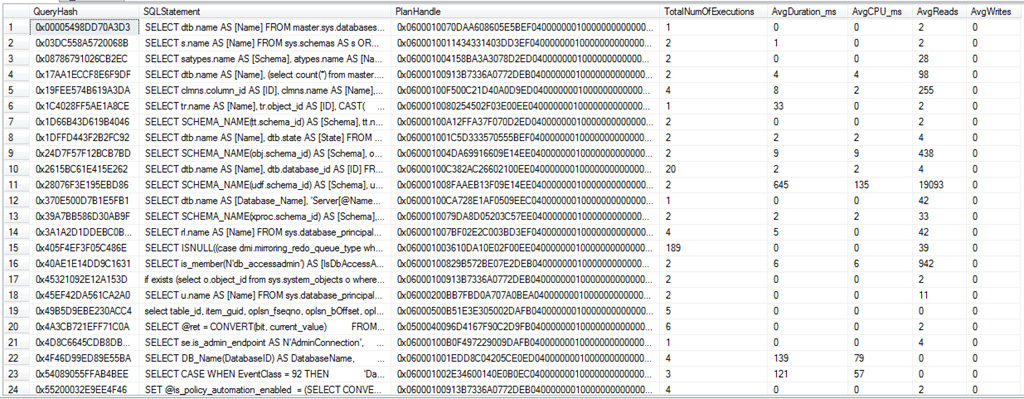
If you notice I don’t have any kind of sort or Top 50 function. Reason is I don’t want to tax SQL Server; after this list is produced I can pull it into Microsoft Excel for analysis. On a 32-bit system you can get away with doing this right on server; however on 64-bit server with 128GB of memory, the data set returned can be large trying to do top 50 or other sorting can be costly.
Also please note I didn’t include sys.dm_exec_query_plan for similar reasons. After I find the statement I want to focus on I’ll use the value of PlanHandle to pull out the individual plans.
 SQL Canada (SQLCAN)